The email came four minutes after you hit submit. "We have decided to move forward with other candidates." Did anyone read your CV?
Maybe not. Often a rule did it, or a recruiter clicked a reason from a list. This guide shows what the software vendors' own help pages say about that, what the email probably means, and when you can apply again.
One honest note first: no public study tells us how many rejections are automatic. We did not find one, so we give no percentage. Everything below comes from vendor docs and company pages.
What can happen behind the email
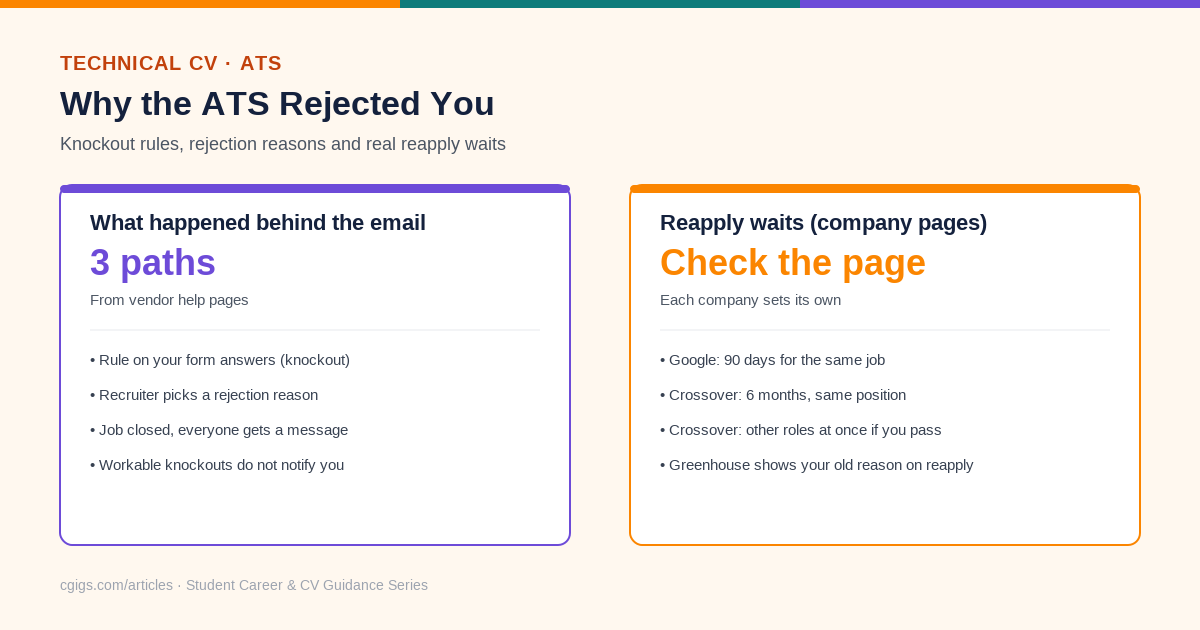
Three things, in the vendors' own words:
• A rule rejects you. The employer set questions on the application form and a rule rejects certain answers.
• A person rejects you with a reason. The recruiter clicks reject and picks a reason from a list the company set up.
• The job closes. The company stops hiring for it and everyone left gets a message.
1. Knockout questions: the rule version
Greenhouse has an Auto-Reject feature (Plus and Pro plans). The employer builds custom application questions, then a rule that rejects candidates by their answers. Details from the help pages:
• It works on Yes/No, single-select and multi-select questions.
• A rule can combine several questions. When two auto-reject rules match, the older one applies.
• Each rule carries a rejection reason, for example "Needs Visa" or "Lacks Skills".
• Each rule can be set to send an email or not.
• The rejection lands in the Application Review stage.
Workable calls them knockout questions. They are Yes/No only. If you answer "No" to one, the system disqualifies you. Two surprises:
• You are not told. You still get the normal "we received your application" email.
• The recruiter sees you in a Disqualified tab, marked "Auto-disqualified" and "Doesn't have required qualifications", and can switch you back.
The usual knockout topics (our reading, based on the examples above): work authorization or sponsorship, a minimum degree, an expected graduation date, location, and a required licence.
2. Disposition codes: the human version
A disposition (Greenhouse: rejection reason; Lever: archive reason) is a label recorded when someone ends your application. Admins set up the list.
• Greenhouse. Reasons are configurable and an admin can make them required. The help page shows examples like "Failed Test", "Failed Background Check" and "Company does not wish to sponsor work visa". If you re-apply, Greenhouse flags a duplicate and the old rejection reason shows on your profile.
• Workday. Admins create dispositions, assign them to stages, and map each to "Rejected" or "Declined by Candidate". They can add a candidate-facing label and a custom notification per reason.
• Lever. Archive reasons are added or edited by an admin under Settings (Pipeline and archive reasons). There is no fixed public list; each company decides.
One real list, from one employer (not the Workday default): Texas A&M System's Workday guide lists these for the first review stage:
Their guide also says candidates get a general notification and do not see the reason chosen. That is normal. The label is for the employer's records and reports.
Why timing differs: minutes vs days
• Minutes. A rule fired on your form answers, and its email was set to send.
• Hours to days, generic text. A recruiter rejected you from a list and Greenhouse lets them pick a delay from a dropdown before the email goes out.
• Weeks. Batch closing after the job is filled, or a stage move later in the process.
• Nothing at all. Greenhouse has "Reject and don't send email", and Workable's knockouts do not notify you. Silence can still be a rejection.
So timing hints at the path, but it is never proof.
Decision table: what the email probably means
A parse problem is a different thing from a knockout: if your CV fields come through wrong, a recruiter just sees a messy profile. We tested layouts in our PDF vs DOCX parse test and two-column vs single-column test.
Worked example: made-up, but built from the real rules
Nobody read your CV. The rule did exactly what the employer wrote. That is why you should:
• Answer honestly. Never lie on these. The answer is recorded and it can be checked later.
• Look for roles where the company states it sponsors.
• Choose the graduation-date answer that matches your real dates, and write them the same way on your CV.
Reapplying: what companies actually say
What this tells us:
• Cool-downs are set by each company, often per role. There is no standard number.
• A common range we saw in official pages is 3 to 6 months. The 12 to 18 months from Google is advice about experience, not a ban.
• Greenhouse shows the old rejection reason on your profile if you re-apply, so an unchanged CV invites the same result.
A simple plan:
1. Find the company's FAQ or the job post. Write down any wait time.
2. Put the date in your calendar.
3. Change something real before you apply: a project, a result, a skill with proof.
4. Apply to a different role in the meantime if the page allows it.
5. If there is no rule, email the recruiter once and ask. Keep it short.
Sources (all checked 2026-11-27):
• Greenhouse Support, Application Rules Overview (Auto-Reject): https://support.greenhouse.io/hc/en-us/articles/203105595-Application-Rules-Overview
• Greenhouse Support, Best practices: Strategic use of rejection reasons: https://support.greenhouse.io/hc/en-us/articles/360000769051-Best-practices-Strategic-use-of-rejection-reasons
• Greenhouse Support, Reject a candidate: https://support.greenhouse.io/hc/en-us/articles/360025225732-Reject-a-candidate-
• Workday Documentation, Create recruiting dispositions: https://doc.workday.com/admin-guide/en-us/human-capital-management/recruiting/recruiting-setup/create-recruiting-dispositions.html
• Texas A&M System, Workday job application disposition reason by stages: https://it.tamus.edu/workdayservices/training/reference_guide/job-application-process-disposition-reason-by-stages/
• Lever Help Center, Adding archive reasons: https://help.lever.co/hc/en-us/articles/20087343124509
• Workable Help Center, Knockout questions: https://help.workable.com/hc/en-us/articles/115012238688
• Google Careers Help, Apply for a job: https://support.google.com/googlecareers/answer/6095391?hl=en
• Crossover Support, Reapplying after getting rejected: https://support.crossover.com/article/6629-reapplying-after-getting-rejected
• Cathay Pacific Careers FAQ, pilot re-apply: https://careers.cathaypacific.com/en/faqs/hong-kong/pilot/firstsecond-officer/ive-applied-to-the-programme-before-but-was-unsuccessful-when-can-i-re-apply
The job post, rules, times and the "what it probably means" column are examples or our own reading, not vendor statements. Each company configures its own system, so the same words can mean different things. We could not find public iCIMS documentation on this, so it is not covered.
Get a clear CV that passes the first screen and shows proof.
Build your CV free