You want an internship. You find an engineer on LinkedIn. You type a long message about yourself, then delete it. Sound familiar?
Short messages tend to get more replies. We checked what the data says, where it applies to students and where it does not. You get a 75-word template, with the count shown, plus variants. The people and company in the examples are made up.
What the data says, and what it does not
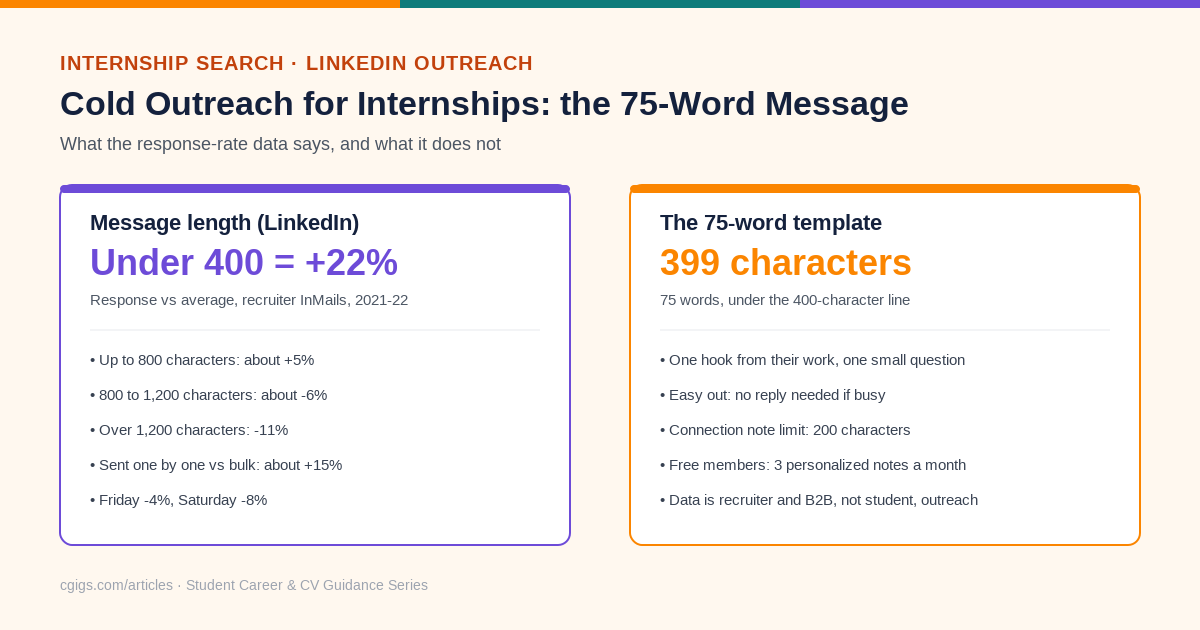
There is no public study of students messaging professionals on LinkedIn. We looked and found none. The best data is about recruiters messaging candidates and salespeople messaging buyers. Use it as a hint about how people read short messages from strangers, not as a promise.
How to read these honestly:
• LinkedIn's numbers are relative to its average, not absolute reply rates. The blog does not give a base rate.
• Recruiters offer jobs. Students ask for time. Replies to students may be lower or higher. We do not know.
• Belkins covers sales messages. The HR 10.9% means HR people reply more to sales pitches. It does not say they reply to students.
• Vendor blogs give wide InMail averages (6% to 25%). They use different methods, so we do not quote an average.
What the data does support: short, one-by-one, sent early in the week, with a note. That matches common sense. A busy engineer reads the first two lines on a phone.
Worked example: how many characters is 75 words?
The LinkedIn study draws its line at 400 characters. Our template below is 75 words and 399 characters with spaces, counted by a script. So it fits the "under 400" group. If you edit it, count again.
Quick rule: 75 words at an average of about 5.3 characters each, spaces included, is about 400. Plain short words help you stay under.
Who to message: engineering leads or recruiters?
No dataset compares the two for students. This is practical advice, so treat it as opinion:
• Recruiters can start a hiring process. They get a lot of messages, and for interns often they work from a form. Message them if the posting says to, or to ask about the timeline.
• Engineers and team leads know the work. They can answer a real question, and they may know about openings before they are posted. Ask them a question, not for a job.
• Alumni from your school are the warmest. Start there. See the 15-minute alumni script.
• Pick one person per team. Do not message five people at one company on the same day.
The 75-word template
Why each part is there:
• Who you are, 1 line. Year, subject, school.
• A real hook. You read their post and tried something. This is the personalization that matters. "I admire your work" is not a hook.
• One small question. They can answer it in two lines.
• An easy out. "No reply needed" lowers the cost of saying nothing, and people often reply anyway.
• A link in your own words. Link a repo or demo (see the portfolio README guide).
Where it goes: the connection note limit
A connection request note is much shorter than an InMail.
• LinkedIn's help page says each personalized invitation can be up to 200 characters, and free members can add a personal message to up to 3 requests per month. Premium members can send unlimited personalized invitations.
• Some third-party guides say Premium allows 300 characters. We could not confirm that on LinkedIn's own page, so check the box when you type. The counter shows what you have.
• InMail text can run to about 1,900 characters (LinkedIn sales resources; some sites say 2,000). Sending InMail usually needs a paid plan, so most students use the note, the message after accepting, or email. The length limit is not the problem. Your reader is.
So the 75-word message above is for a message sent after they accept, or an InMail, or email. For the note itself, use a 200-character version:
With only 3 free notes a month, save them for people you most want. Send the others as plain requests and follow up with a message after they accept.
Variants
Call to action: lower the friction
Think about what you ask them to do.
• Zero effort: nothing, just reading. Good for a first touch.
• Low: answer one question in two lines. Best for a cold message.
• Medium: a 15-minute call. Good after they replied once.
• High: read your CV and refer you. Ask only after the first replies.
We found no study that measures this ladder for students. It is a practical rule, and it matches the career-center advice to ask for a conversation, not a job.
A simple tracking plan
You will not know your reply rate unless you count. Use a sheet.
• Columns: name, company, date sent, channel, message version, replied (yes/no), next step.
• Send 10 per week, one person per team.
• After 30 messages, compare. If fewer than 3 replies, change the hook, not the length.
• Follow up once after 7 days, with 2 lines. Then stop.
Example (made up): 30 messages, 4 replies is 13%. That would be a good result. If you get 0 of 30, the hook is probably the problem. Check you wrote about something real in their work.
Mistakes to avoid
• Pasting the same text to 50 people. LinkedIn's data shows bulk sends get less.
• Asking "do you have internships?" with no question about their work.
• Attaching a CV to a first message to an engineer.
• Sending on Friday or Saturday (LinkedIn's data shows lower responses).
• Writing more than you would say out loud in 30 seconds.
Before you send, check your own profile. It is the first thing they will click. See LinkedIn headlines for students.
Sources (all checked 2026-11-27): LinkedIn Talent Blog, How to Improve Your InMail Response Rate, According to LinkedIn Data (19 May 2022), https://www.linkedin.com/business/talent/blog/talent-strategy/these-inmails-get-best-response-rates. Belkins, LinkedIn B2B outreach statistics: 2026 study, https://belkins.io/blog/linkedin-outreach-study. LinkedIn Help, Personalize invitations to connect, https://www.linkedin.com/help/linkedin/answer/46662. LinkedIn Sales Solutions, Keep readability in mind (InMail length), https://business.linkedin.com/sales-solutions/resources/improve-inmail-response-rates/keep-readability-in-mind. The people, companies and messages are made-up examples. The character counts were counted by script. No public data on students' reply rates was found.
Message ready? Make sure the CV they open next is just as sharp.
Build your CV free