Open source is the closest thing a student has to a real work history. Strangers reviewed your code and merged it. That is worth a line, if you present it right.
This guide covers how to pick a repo, which kinds of work count, how to write each as a bullet, and how to prove your numbers with exact GitHub search strings.
Why employers care
A merged pull request shows four things a course project cannot:
- You can read code you did not write.
- You can follow a project's rules.
- You took feedback and changed your work.
- Someone else thought it good enough to ship.
One merged PR in a real project says more than ten solo tutorials. Do not pad it, though. Keep it honest and linked. A short, finished contribution to a project people really use is a better story than a long list of half-done ones. It also gives you something concrete to talk about when an interviewer asks how you work with other people's code, how you handle review comments, and what you do when you are stuck.
Step 1: pick the right repository
GitHub's docs say that many projects use the good first issue or help wanted labels to help new contributors find work. They also say to check that the repository is actively maintained (the Pulse view shows recent activity), and that each project has its own way of accepting contributions, so read it first. For bigger changes they suggest opening an issue to describe your plan before writing code.
Turn that into a checklist:
The last four rows are our own rules of thumb, not GitHub's. Search for beginner issues with a query like this in GitHub's issue search:
(label: and language: appear in GitHub's search docs. no:assignee is a common qualifier that we could not confirm on that page, so test it.)
Step 2: know the four kinds of contribution
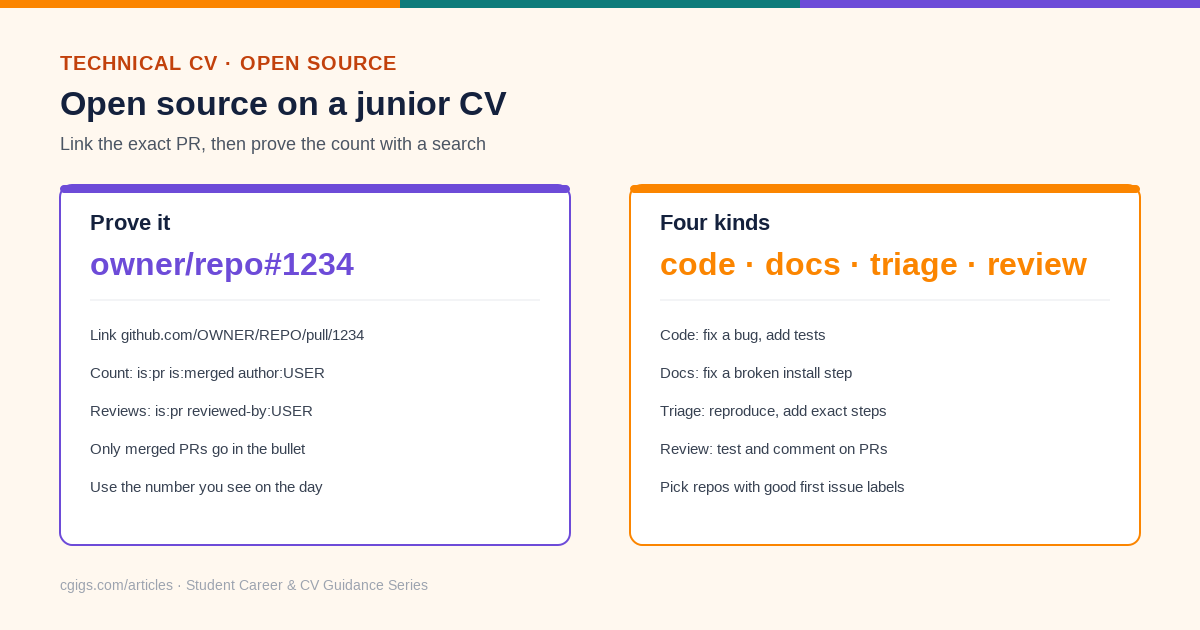
Code is not the only kind. Employers also value these:
GitHub's own contributing docs say contributions are not limited to code, and list testing someone's pull request as one example. Pick the kind you can do well and finish it.
Step 3: write each one as a bullet
Formula: verb + what + where + result + link. The projects below are made-up examples (example-org/example-lib does not exist). Use your own real PR numbers.
Notice the pattern: a plain-words result, a number you can count, and a real reference. Pair these with strong verbs from our action verbs and XYZ formula guide.
Commits vs documentation value
Do not count commits. One PR can have 12 small commits, and depending on the merge method the maintainers may squash them into one. The commit count tells nobody anything. Count these instead:
- Merged PRs (the real unit).
- What changed for users: a crash fixed, a step that now works, a page that is now correct.
- Tests added, with a number.
A docs PR that fixes a broken install step helps every new user the same day. That can be worth more than a 3-line code tweak. Say so with the effect, not with adjectives.
Link the exact PR: the owner/repo#1234 format
Write references as owner/repo#1234. GitHub turns that pattern into a link in issues, comments and READMEs. On a PDF CV it is just text unless you add the link yourself. The full address is:
Tips:
- Link the specific PR, not the repo home page.
- Keep the visible text owner/repo#1234 so a printed copy still lets a reader find it.
- If you have more than 3 PRs, link the best 2 and add a search link for the rest.
- Add one line in your GitHub profile README listing the same PRs. Our technical skills section guide covers keeping CV and profile in sync.
Verify your count with GitHub search
Before you write "5 merged PRs", check. Paste these into GitHub's search bar (replace USER with your username). The qualifiers is:pr, is:merged, author:, merged:>= and reviewed-by: are in GitHub's search docs.
Then:
- Remove your own repos from the count. A query like is:pr is:merged author:USER -user:USER is the natural way to do this, but the negated -user: form is not shown in GitHub's docs, so test it and check the first results by eye.
- Open each PR and confirm the status says Merged, not Closed.
- Write the number you see on the day you apply.
Pitfalls
- Spam PRs. Fixing a comma in a README to fill a quota is noise. Maintainers see it.
- Event-driven trivial PRs. Hacktoberfest's participation rules say that PRs labelled as spam do not count and that repeated spam can get a participant disqualified. Even in an event built around PR counts, quality comes first.
- Claiming a PR that was closed or never merged. Only merged work goes in the main bullet.
- Counting an issue as a contribution. Opening an issue is fine; do not call it a feature you built.
- Taking credit for the whole project. Say which part you changed.
- Skipping the rules. Read the contributing guide first. A PR that ignores the rules tends to get closed.
- Going silent. If a maintainer asks for changes, answer. Unfinished PRs do not count.
Put your GitHub profile link in the header and make sure your pinned repos match the story. Pair this with at least one personal project; see our guide on hackathon projects on a graduate CV.
How to talk about it in an interview
A bullet gets you the question. Be ready for it. For each PR, prepare four short answers:
- The problem. What was broken, in one sentence.
- Your fix. What you changed and why that way.
- The feedback. What the maintainer asked you to change, and what you did.
- The result. How it is used now, or what it fixed.
If you cannot explain a line of your own PR, do not put it on the CV. Open the diff the night before and read it again.
What a good PR looks like
Small PRs get merged more often than big ones. A simple shape works:
- One problem per PR.
- A title that says what changed: "Fix crash on empty CSV header".
- A description that links the issue and says how you tested it.
- Tests or doc screenshots if the project expects them.
- A polite reply to every review comment, even when you disagree.
This is our advice from common practice, not a GitHub rule. Always follow the project's own contributing guide first.
Your 30-day plan
- Day 1: pick two repos from the checklist.
- Week 1: read the rules, comment on one issue so the maintainer knows you are working on it.
- Week 2: open a small, focused PR with tests or docs.
- Week 4: respond to review, get it merged, then add the bullet with owner/repo#N.
Sources (checked 2026-11-26): GitHub Docs, Finding ways to contribute to open source on GitHub, https://docs.github.com/en/get-started/exploring-projects-on-github/finding-ways-to-contribute-to-open-source-on-github (checked 2026-11-26). GitHub Docs, Searching issues and pull requests, https://docs.github.com/en/search-github/searching-on-github/searching-issues-and-pull-requests (checked 2026-11-26). Hacktoberfest participation rules, https://hacktoberfest.com/participation/ (spam rule as quoted in search results; page itself not opened; checked 2026-11-26). All example repositories, PR numbers and bullets above are invented.
Put your merged PRs and projects on a clean one-page CV.
Build your CV free